Anitype Journal 4 Font Preview
Rendered live in your browser
60px
Sphinx of black quartz
36px
The five boxing wizards jump quickly
20px
Pack my box with five dozen liquor jugs. Waltz, nymph, for quick jigs vex Bud.
36px · dark
Anitype Journal 4
ABC
DEF
GHI
JKL
MNO
PQR
STU
VWX
YZ
·
abc
def
ghi
jkl
mno
pqr
stu
vwx
yz
·
012
345
678
9




Anitype Journal 4 Font Details
| Format | OTF OpenType File Format |
| Style | 4 |
| Foundry | Skyhaven |
| Copyright | Skyhaven |
| Version | Version 1.000;PS 001.000;hotconv 1.0.88;makeotf.lib2.5.64775 |
| File name | anitypejournal-4.otf |
| File size | 19 KB |
| Licence | Personal use · check for commercial |
Design Context for Anitype Journal Typeface
Anitype Journal is a composed and adaptable typeface that performs quietly and consistently across a wide range of design contexts.
A dependable choice for both digital and print design across branding, editorial, and UI contexts.
Available in OpenType (OTF) format.
Font Pairing: Pairs effectively with both display and text companions — its neutral character adapts well to most typographic systems.
Pro Tip: Pair Anitype Journal with a font of contrasting weight or personality to build a more expressive typographic hierarchy.
Anitype Journal 4 Test Drive
Type to preview
Anitype Journal 4 Character Map
Complete glyph index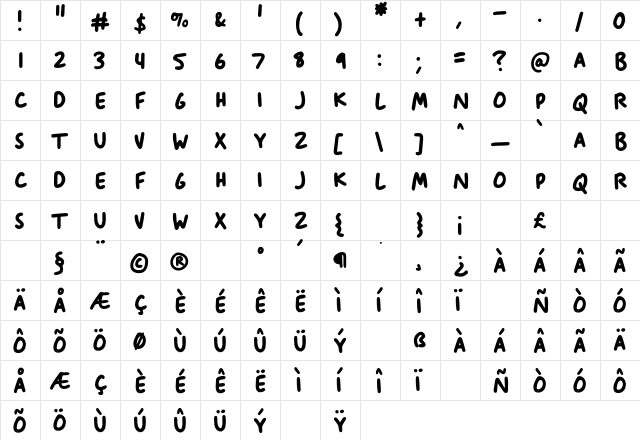
Download Anitype Journal 4
- File name
- anitypejournal-4.otf
- File size
- 19 KB
- Format
- OpenType (OTF)
- Version
- Version 1.000;PS 001.000;hotconv 1.0.88;makeotf.lib2.5.64775
- Licence
- Personal use · check for commercial
Share Anitype Journal 4 Free Font
| Short URL | |
| Permalink URL | |
| Standard HREF Link Code | |
QR Code Link  | |
Copied to clipboard! |
|
Frequently Asked Questions
Is Anitype Journal 4 free to download?
Yes, Anitype Journal 4 is available as a free font download. However, you should always review the license details to confirm whether it is free for personal use, commercial use, or both.
How do I install Anitype Journal 4?
Download the .otf file and unzip it if necessary. On Windows: right-click the file and select "Install." On Mac: double-click the file and click "Install Font" in Font Book. The font will then be available across all your applications.
Is Anitype Journal 4 safe to download and use?
Anitype Journal 4 is safe to download when obtained from a trusted font website such as fontsbin.com For extra security, scan the font file with antivirus software before installing.
How do I uninstall Anitype Journal 4 font?
On Windows, go to the Fonts folder in Control Panel, select the font, and click “Delete.” On Mac, open Font Book, select Anitype Journal 4, and choose “Remove.”